Trajectories
Record human demonstrations as structured, replayable trajectories.
A trajectory is a recorded session on a live sandbox: every click, keystroke, and scroll captured as a typed action, paired with a screenshot and the accessibility tree at each step. Collect them from the dashboard, inspect them step by step, replay them on a fresh sandbox, and export them for evals or training.
Collecting
From the dashboard's Trajectories tab, click New trajectory and write the instruction the demonstration should accomplish. Trajectory collections run on one of your Mac mini reservations.
The collector opens the live macOS desktop in your browser:
- Setup: get the sandbox into its starting state. Run shell commands, upload files, open apps. Nothing is recorded yet; setup steps are stored separately from the task.
- Record: click Start Recording Task and perform the task by hand. Every click, keystroke, scroll, and drag is captured as a typed action with a screenshot and the accessibility tree before and after.
- Finish & save: the trajectory saves immediately. The screen recording finalizes in the background and appears on the detail page shortly after.
Inspecting
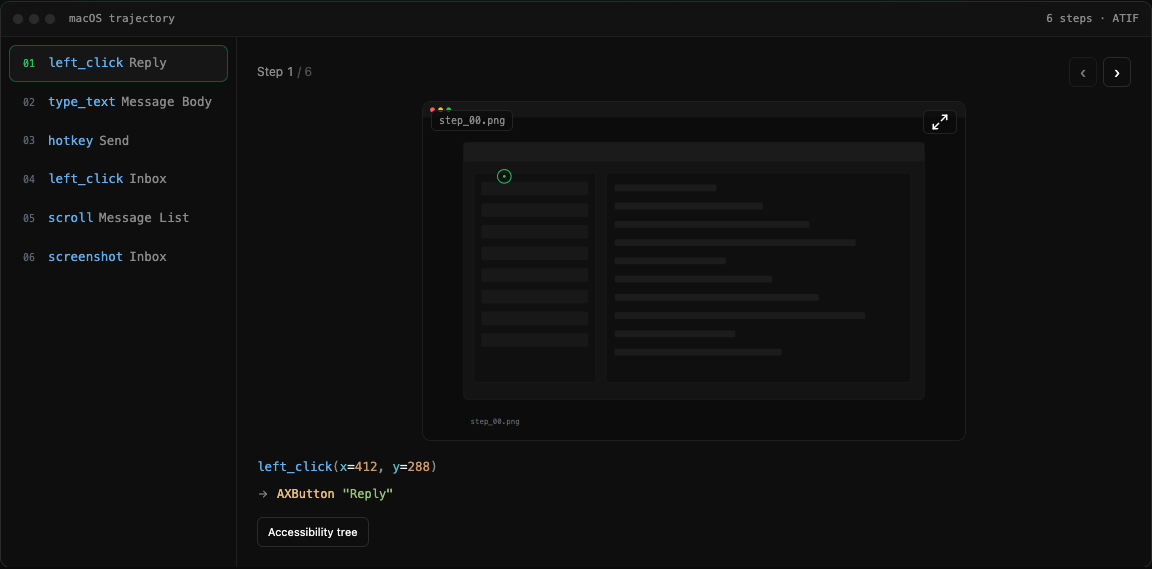
Each trajectory's detail page shows the step timeline: select a step to see its annotated screenshot (a crosshair marks the action's coordinates), the action as a typed call like left_click(x=412, y=288), the resolved accessibility element it hit, and the before/after accessibility trees. The full screen recording sits below the steps.
The instruction, category, and a setup script (setup.sh, run before each replay) are editable in place.
Replaying
Replay boots a fresh sandbox, runs the setup script, and re-executes the recorded actions. A live VNC link lets you watch the run; if the task has a grader, the reward is reported when the replay completes.
POST /v1/me/tasks/{id}/replay        -> { id, status, sandbox_id }
GET  /v1/me/tasks/replays/{replayID} -> poll status until completed/failed
Exporting
Trajectories are stored in ATIF (Agent Trajectory Interchange Format): a task plus ordered steps, where each step carries its tool_calls (function + args) and an observation with the screenshot.
GET /v1/me/tasks                   -> list trajectories
GET /v1/me/tasks/{id}              -> full trajectory (steps, app state, setup)
GET /v1/me/tasks/{id}/trajectory   -> ATIF JSON
GET /v1/me/tasks/{id}/download     -> ZIP: trajectory.json + images/ + setup
GET /v1/me/tasks/{id}/recording    -> screen recording (mp4)
Auth is the same Authorization: Bearer uc_live_... as the rest of the HTTP API. The ZIP is self-contained: ATIF JSON, per-step PNG screenshots, task metadata, and the setup script, ready to feed into an eval harness or a training pipeline.